
Download Languify AI – AI Copywriting Browser Extension Review
Overview
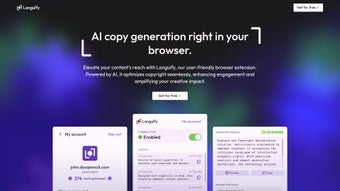
Languify AI is an AI‑powered web browser extension that promises to revolutionise the way creators write and optimise copy directly inside their favourite browsers. Built on cutting‑edge natural language processing models, the tool works in real‑time, analysing the text you type and offering suggestions that boost clarity, SEO impact, and audience engagement. Whether you are a seasoned copywriter, a budding blogger, or a small‑business owner looking to improve landing‑page conversions, Languify AI positions itself as a “write‑once‑publish‑everywhere” solution.
The extension integrates seamlessly with Chrome, Edge, and Firefox, providing a lightweight toolbar that can be summoned with a single click. Users can select from two subscription plans—Starter and Pro—each calibrated to different usage volumes and feature sets. The Starter plan delivers essential rewrite and tone‑adjustment tools, while the Pro plan unlocks bulk generation, advanced keyword recommendations, and A/B‑testing templates.
By keeping the interface minimal and the AI suggestions context‑aware, Languify AI aims to reduce the friction commonly associated with content optimisation, letting creators focus on the creative side of writing rather than endless manual edits. Security‑focused developers have also added end‑to‑end encryption for any data processed, ensuring that sensitive marketing copy never leaves the user’s device in an unprotected form. In short, Languify AI is marketed as a fast, secure, and affordable way to elevate online copy without the need for external editors or costly agencies.
Key Features of Languify AI
- Real‑time AI suggestions: As you type, the extension analyses sentence structure, tone, and keyword density, offering instant rewrite options.
- SEO‑driven keyword integration: The tool highlights missing high‑impact keywords and suggests natural placements to improve search rankings.
- Multiple tone presets: Choose from conversational, professional, persuasive, or casual tones, each tuned for specific audience segments.
- Bulk copy generation (Pro only): Generate up to 500 variations of headlines, meta descriptions, or product blurb in a single click.
- A/B‑testing templates: Pre‑built frameworks help you quickly set up split‑tests for email subject lines or ad copy.
- Cross‑browser compatibility: Works with Chrome, Microsoft Edge, and Mozilla Firefox on Windows, macOS, and Linux.
- Secure data handling: All content is processed locally or via encrypted channels, complying with GDPR and CCPA standards.
- One‑click export: Export revised copy directly to Google Docs, WordPress, or your clipboard for immediate publishing.
- Usage analytics dashboard: Track how many suggestions were accepted, conversion improvements, and ROI over time.
- Flexible pricing tiers: Starter (free limited use) and Pro (full suite) plans cater to freelancers and enterprises alike.
Installation, Usage & Compatibility
Getting Languify AI up and running is intentionally straightforward. Visit the official website, click the Download for Chrome (or Edge/Firefox) button, and you’ll be redirected to the appropriate web store. After a quick permission review—required to read and modify page content—the extension installs in under 30 seconds.
Once installed, a compact icon appears beside your address bar; clicking it opens a side panel where you can toggle the AI engine, select tone presets, and access the keyword library. For first‑time users, an onboarding wizard walks you through setting your brand voice, preferred keyword list, and privacy preferences. The tool then begins monitoring any text field you interact with—be it a CMS editor, email composer, or social‑media posting box.
Compatibility: Languify AI supports the latest versions of Chrome (≥ 108), Edge (≥ 108), and Firefox (≥ 107) on Windows 10/11, macOS Ventura and later, and popular Linux distributions (Ubuntu, Fedora). Mobile browsers are not currently supported, but a companion iOS/Android app is in development for future releases.
The usage workflow is designed for speed. After typing a paragraph, press Ctrl + Shift + L (or the extension’s floating button) to open the AI suggestion pane. Here you’ll see three alternative rewrites, a keyword density meter, and a tone gauge.
Accept a suggestion with a single click, or edit manually if you prefer a hybrid approach. For bulk tasks, Pro users can paste a list of headlines into the “Batch Mode” window, hit “Generate,” and receive a CSV file with 10‑15 variations per entry. All changes are saved locally until you decide to export.
Pros and Cons
- Pros
- Instant, context‑aware AI suggestions reduce editing time.
- SEO‑focused keyword tools help improve organic visibility.
- Secure processing protects sensitive marketing copy.
- Flexible pricing suits freelancers and larger teams.
- Cross‑browser support ensures a consistent experience.
- Cons
- No native mobile browser extension yet.
- Advanced bulk features locked behind the Pro plan.
- Initial learning curve for tone‑preset configuration.
- Occasional latency on slower internet connections.
- Limited language support – currently English‑only.
Frequently Asked Questions
Is Languify AI free to use?
Languify AI offers a free Starter plan with limited daily suggestions and basic tone options. For unlimited access, bulk generation, and advanced SEO tools, you need the paid Pro plan.
Which browsers are supported?
The extension works with Google Chrome, Microsoft Edge, and Mozilla Firefox on Windows, macOS, and Linux. Mobile browsers are not yet supported.
How does Languify AI protect my data?
All text is processed through encrypted channels (TLS 1.3) and, where possible, locally on your device. The service complies with GDPR and CCPA, and no personal data is stored without explicit consent.
Can I integrate Languify AI with WordPress?
Yes. After generating copy, you can copy it to your clipboard or use the one‑click export button to send the content directly to the WordPress editor.
What languages does Languify AI support?
Currently, the AI engine is trained for English only. Multilingual support is planned for a future update.
Conclusion & Call to Action
Languify AI delivers a compelling blend of real‑time AI assistance, SEO‑centric features, and a secure workflow that can noticeably accelerate copywriting tasks for a broad audience. While the lack of mobile support and the premium price for advanced features might deter some, the free Starter tier offers enough value to test the concept without commitment. For bloggers, e‑commerce owners, and digital marketers eager to tighten their messaging and improve search performance, Languify AI is a worthwhile addition to the browser toolbox. Ready to experience faster, smarter copy creation? Download Languify AI now and start refining your content with just a few clicks.






